Introducing Griddly: The Lightweight Screen Overlay for Precision Design

Have you ever needed a persistent, configurable grid to align windows, check layout symmetry, or guide your digital art, only to find that most tools get in the way of your actual work?
Enter Griddly – a Windows utility designed to provide a visual anchor without ever interrupting your workflow.
What is Griddly?
Griddly is a “click-through” screen overlay. It renders a customisable grid over your entire workspace, but remains “invisible” to your mouse. This means you can continue to click, drag, and interact with your applications exactly as if the grid wasn’t there.
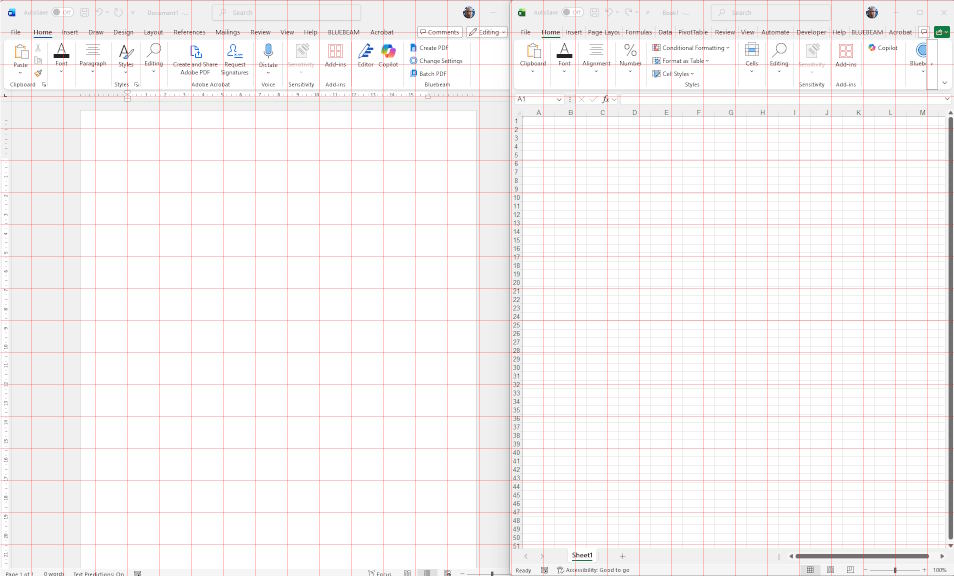
Key Features
- Zero Interference: Ensures all mouse events pass directly to the windows underneath.
- System Tray Control: No messy UI windows cluttering your screen. Manage everything from a discreet icon in your taskbar.
- Customisable Spacing: Quickly toggle between different grid densities (e.g. 50px or 100px) to suit your specific project.
- DPI Aware Rendering: Built using GDI+ and modern Windows scaling APIs, ensuring lines remain razor-sharp on 4K and high-density displays.
- Minimalist Footprint: Written in native C++ for near-zero CPU and RAM impact.
How it Works
Griddly leverages Layered Windows technology. By creating a transparent top-level window that covers the virtual screen, it draws a geometric grid using GDI+ while telling the Windows OS to ignore the overlay during hit-testing. The result is a rock-solid visual guide that feels like it’s etched onto your monitor glass.
How to install
Simply unzip to a location of your choosing and run the griddly.exe file. Doesn’t need to be specifically installed.
Once it runs you’ll see a grid appear on your screen. Use the task bar icon to exit or configure the grid settings.
Why Use Griddly?
Whether you are a web developer checking column alignments, a UI designer ensuring consistent spacing, or just someone who likes an organized desktop, Griddly provides the structure you need without the bloat of traditional design software.
Download it free from here:



This is just what I was looking for!!
Brilliant work.